
Browser extension
Save a word with its context
Save a useful meaning so Stickly can resurface the word while you read.
2 min read · Updated 2026-08-22
Translate before saving
Select the unfamiliar word, trigger a translation, and read the sentence around it. Context helps you decide whether the displayed meaning fits the way the word is being used.

Save a useful learning item
Review the source word, translation, and context in the bubble, then choose the save action. Close the bubble and return to reading once the meaning feels worth revisiting.
See it again while reading
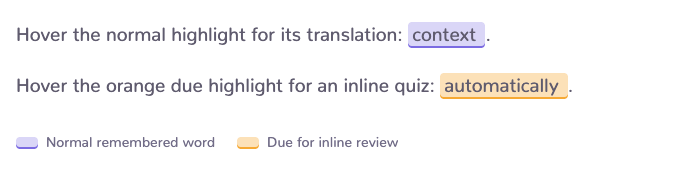
Saved words can be highlighted when they appear again. Depending on your preferences and review state, hovering can show the translation or open an inline quiz.
Keep the list useful
Save meanings you would recognize in the sentence, prefer a word over a whole paragraph, and edit or remove an item when its meaning no longer helps. A smaller, clearer list is easier to review.
Still stuck?
Tell us what happened.
Include the page, browser, and what you expected. A human reads every message.