
Words & review
Find your way around Word Hub
Use Word Hub to focus a language pair, hear words, inspect progress signals, and manage your collection.
5 min read · Updated 2026-08-22
The Word Hub layout
Word Hub is the webapp’s vocabulary-management center. It combines a language focus, listening and context areas, reflection visuals, and a searchable collection.
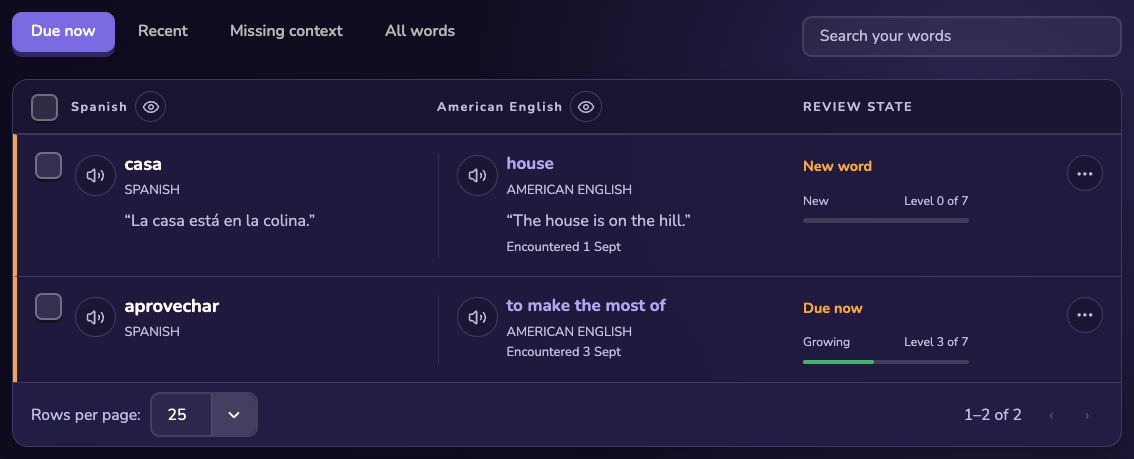
Choose what to see
Open the focus control: Choose your main language, a language pair, other pairs, or all words. Use the due signal: Open the words ready to hear or review when you want a focused session. Search the collection: Search by word or translation, then page through matching results.
Manage a word
Play pronunciation from the word’s audio control. Edit a translation or context when the saved item needs correction. Select and delete words only after checking the selection. Inspect next review, proficiency, and context coverage as planning signals.
Read the reflection areas
The playful visuals summarize orientation signals such as vocabulary maturity, context coverage, language spread, and recent rhythm. They help you notice patterns; they are not precision measurements or achievement badges.
Still stuck?
Tell us what happened.
Include the page, browser, and what you expected. A human reads every message.