
Webapp
What is Practice Studio?
Practice Studio is a standalone, signed-in webapp experience for bounded five-turn text or live-voice language practice.
5 min read · Updated 2026-08-22
A bounded practice session
Practice Studio lets you choose a language pair, level, scenario, and practice style, then complete a five-turn exchange. It works as a webapp experience and does not require the browser extension.
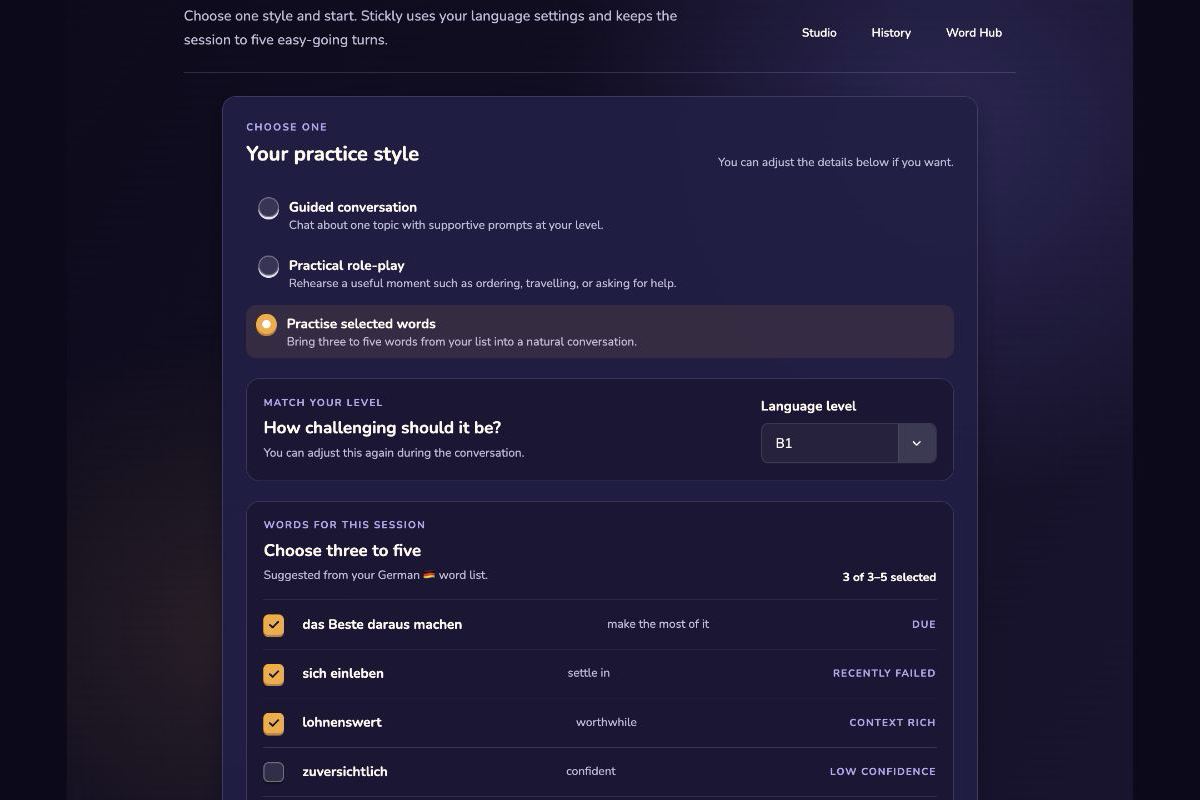
Choose a style
Guided conversation: discuss one topic with a responsive partner. Practical role-play: rehearse a defined real-world situation. Practise selected words: bring three to five saved words into an exchange.
Text and live voice are input choices for the session. Feedback is designed to wait until the exchange is complete rather than interrupt every turn.
Review suggestions yourself
Finish the turns: Complete the bounded exchange and open its review. Try your correction: Write what you think should change before revealing the suggestion. Choose a status: Treat a suggestion as unresolved, plausible, disputed, or verified based on your own judgment and evidence. Save selectively: Choose at most one useful phrase to keep in Word Hub; saving is not the same as recall credit.
Privacy and access boundaries
Practice remembers bounded account and session information needed for the experience. Do not treat generated feedback as an authority on correctness; verify language that matters. Current plan allowances are shown in the product and can use a rolling window.
Still stuck?
Tell us what happened.
Include the page, browser, and what you expected. A human reads every message.