
AI is most useful as an on-demand practice engine, not as the final authority on what is correct. Ask it to create role-plays, pose questions, offer alternative phrasings, or suggest possible corrections. When a suggestion affects something you intend to reuse, submit, publish, or say in a sensitive situation, verify it elsewhere.
That distinction matters because useful feedback is not necessarily accurate feedback. A systematic review of automated written-feedback research found positive, negative, neutral, and mixed validation results; favorable learner reactions or successful revisions did not establish that every correction was valid. Read the systematic review.
A practical workflow is:
Generate → isolate the claim → verify it externally → revise → retain only the verified example.
You do not need to fact-check every line of casual practice. You do need a way to recognize when fluent-looking feedback has crossed from low-risk generation into a claim about grammar, meaning, register, or culture.
Separate generating language from judging language
AI can quickly supply ten interview questions, simulate a hotel check-in, turn vocabulary into a short story, or keep a conversation going. These are generative jobs: their value comes partly from volume, variation, and responsiveness.
Judgment is different. When the model says a sentence is wrong, a phrase is more natural, or a request is polite, it is making one or more language claims. Those claims may depend on dialect, audience, genre, professional convention, or the meaning you intended.
The reliability problem is not merely theoretical. In an exploratory study of beginning Spanish writing, a task-customized GPT showed moderate alignment with human scoring but missed the study’s calibration benchmarks. Its feedback also included vague, incomplete, inaccurate, unnecessary, and inconsistent suggestions. Read the Spanish-writing study.
Evaluations of generative grammatical-error correction have likewise documented overcorrection, with results varying by evaluation setting and learner proficiency. See the multilingual grammatical-error-correction evaluation. See the proficiency-sensitive prompting evaluation.
Reliability may also differ by language. One multilingual educational evaluation found poorer results for lower-resource languages and reported that performance somewhat corresponded to a language’s representation in training data. Read the multilingual evaluation.
The useful decision rule is therefore simple:
- Let AI generate practice freely.
- Treat AI judgments as candidate claims.
- Verify claims in proportion to the cost of being wrong.
Set a verification budget with three risk lanes
Verification should be proportional. Checking every adjective would make practice exhausting, while checking nothing invites plausible errors into your long-term vocabulary and writing habits.
Use three risk lanes to allocate your attention:
Green: reversible practice
Use AI directly for activities where an imperfect response has little lasting cost:
- generating conversation questions;
- creating role-play scenarios;
- producing extra drills from a pattern you already understand;
- brainstorming topics or vocabulary categories;
- asking for several possible ways to continue a dialogue;
- practising rapid responses without saving the output.
Stay alert, but do not interrupt every exercise to investigate a minor doubt. The purpose of the green lane is fluency, retrieval, and exposure—not certification of every sentence.
Amber: reusable language claims
Pause and check suggestions involving:
- a correction you plan to remember;
- a new collocation or idiom;
- an explanation of a grammar rule;
- a claim that one version is more natural;
- a distinction between formal and informal language;
- pronunciation or regional usage;
- a rewrite that may have changed your meaning.
These are consequential because they can become reusable knowledge. Verification does not mean proving the entire response correct; it means identifying and checking the smallest claim that matters.
Red: expert-dependent decisions
Do not rely on AI alone for graded assessments, applications, contracts, medical or legal wording, confidential workplace communication, or culturally sensitive judgments. Seek a teacher, editor, translator, domain professional, or proficient speaker qualified for the relevant variety and context.
Before submitting personal messages, student work, client material, or confidential text to any AI service, review that provider’s current privacy and retention terms. When in doubt, remove identifying details or use invented practice material.
Turn corrections into claim cards
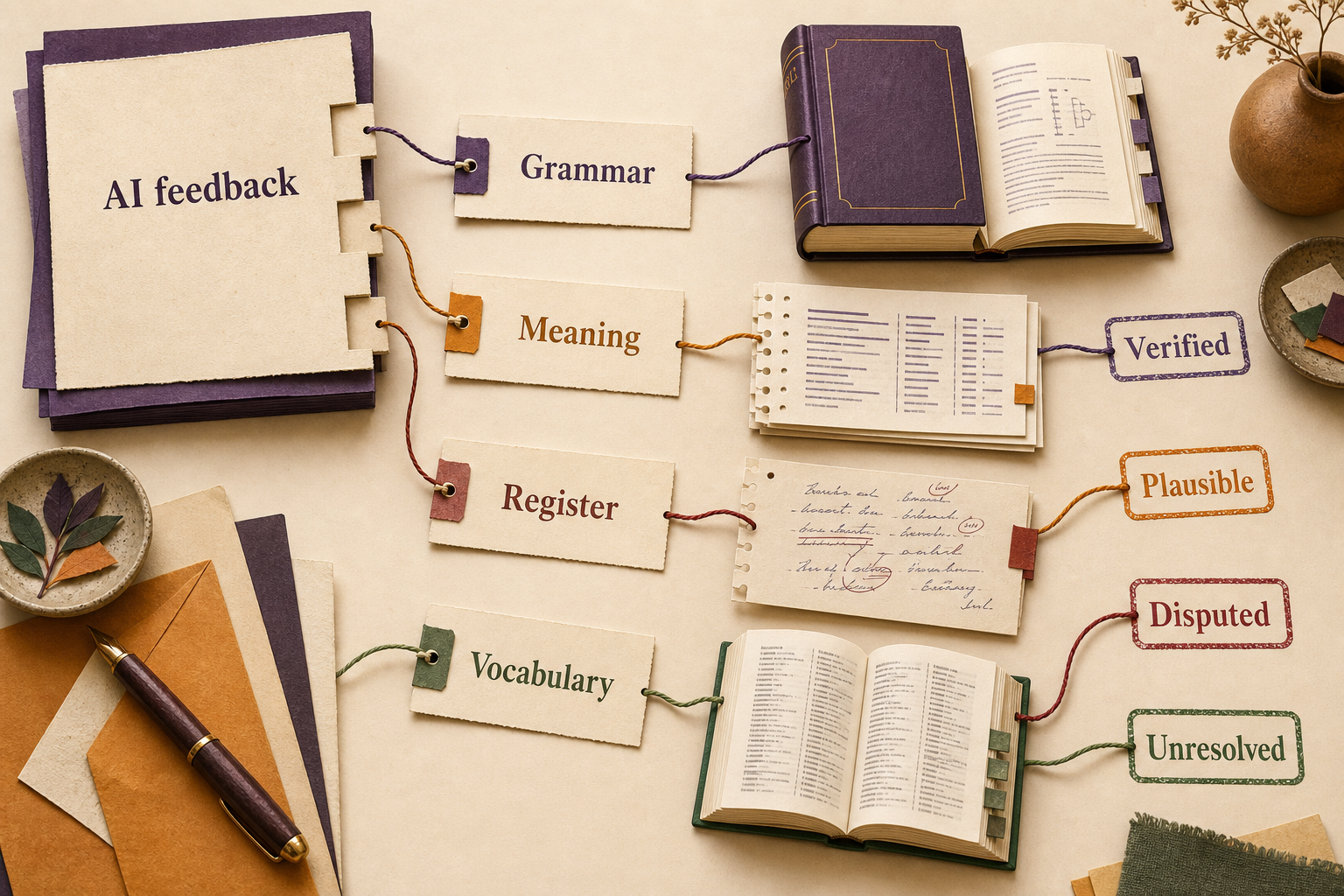
An AI response often arrives as one polished block, encouraging an all-or-nothing reaction: accept it because it sounds confident, or reject it because one detail looks suspicious. A claim card breaks that block into auditable pieces.
For every consequential suggestion, record five fields:
- Original wording: exactly what you wrote or said.
- Proposed change: the model’s minimum suggested revision.
- Smallest testable claim: the reason that would make the change necessary or preferable.
- External evidence: a dictionary entry, grammar, style guide, corpus evidence, or qualified human judgment.
- Status: verified, plausible, disputed, or unresolved.
The method is an original editorial framework, not an experimentally validated language-learning intervention. Its purpose is narrower: to prevent several grammar, meaning, and register judgments from hiding inside one fluent rewrite.
Imagine that a learner writes, “Could you send me the file today?” and the AI replaces it with “Send me the file by close of business.” Do not ask whether the rewrite is simply “better.” Create separate cards:
- Grammar: Was anything grammatically wrong with the original?
- Meaning: Does “by close of business” preserve the intended deadline?
- Register: Is the imperative suitable for this relationship?
- Vocabulary: Is “close of business” normal in the learner’s target region and workplace?
- Edit necessity: Is the change required, or merely stylistic?
One card might become verified while another remains disputed. You can keep the safe finding without accepting the entire rewrite.
A good weekly verification budget might be five amber cards plus every red-lane issue. Prioritize suggestions that are recurring, surprising, disputed, likely to be reused, or costly to misunderstand. Let low-value uncertainties expire instead of building an unmanageable research queue.
Use a verification ladder
Match the source to the question rather than searching for one universal authority.
- Original or governing source: Use an assignment rubric, institutional style guide, official form, or professional standard when that document controls the answer.
- Authoritative reference: Consult a reputable dictionary or grammar for definitions, inflections, constructions, and labeled usage.
- Relevant corpus: Examine how a word or pattern appears in attested contexts.
- Qualified person: Ask a teacher, editor, translator, or proficient speaker who knows the relevant dialect, register, and domain.
Corpus tools can search words, phrases, grammatical patterns, collocates, and concordance contexts, and some support comparisons across genres, countries, periods, or corpus sections. See the English-Corpora.org search documentation.
Corpus frequency is not automatic proof of correctness. Results depend on corpus composition and search design, while an attested phrase may still be unsuitable for your audience or purpose. Look at multiple full contexts and check which genres, regions, and periods they represent.
When sources disagree, do not force a verdict. Record alternatives, identify possible differences in dialect or register, and mark the card disputed or unresolved. Language can sustain more than one acceptable form.
Prompt for restraint, not confidence
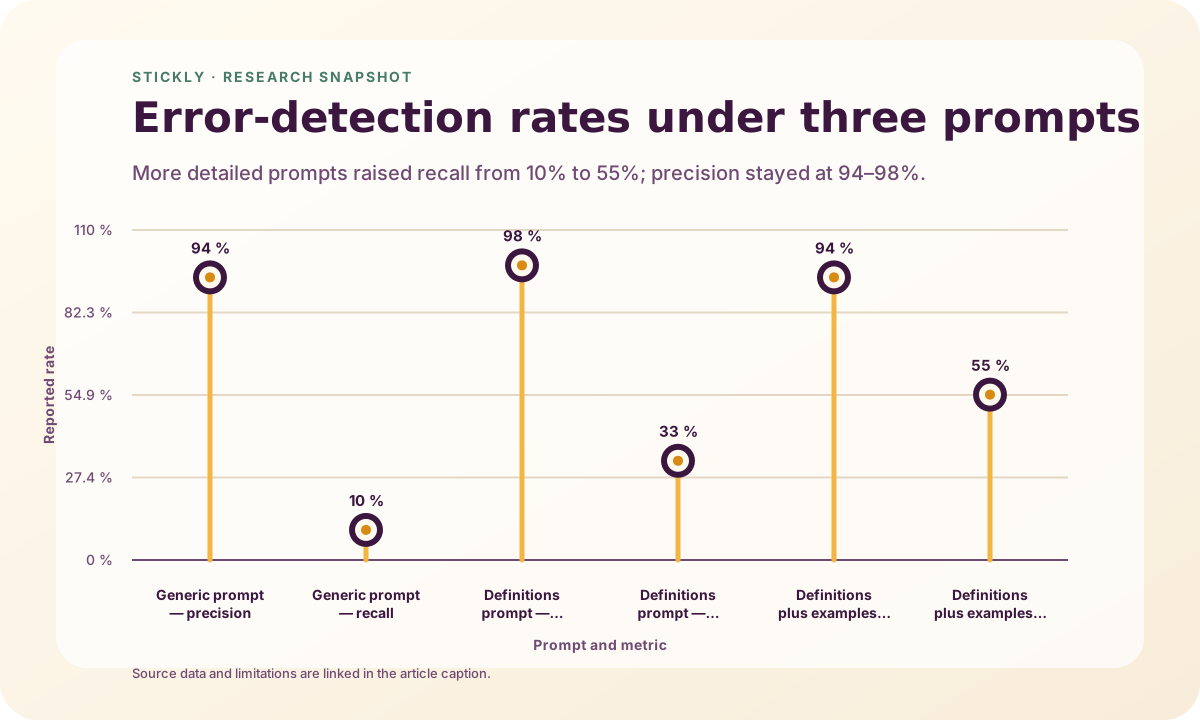
Better prompts can improve a defined task, but they cannot turn a model into a source of record. In one study of 30 intermediate Chinese EFL essays, adding error-category definitions and examples increased ChatGPT-4’s error-detection recall from 10% to 33% and then 55%; precision across the three conditions was 94%, 98%, and 94%. The experiment measured detection against 334 human-coded errors, not the correctness of revisions or explanations. Read the prompt comparison.
Use prompts that make feedback easier to inspect:
- “Preserve my intended meaning and make the minimum necessary change.”
- “Separate definite errors from optional stylistic edits.”
- “For each change, state one small claim that I can verify.”
- “Label claims that may depend on dialect, region, or register.”
- “Do not rewrite the whole paragraph unless meaning cannot otherwise be preserved.”
- “Ask me to self-correct before showing your proposed answer.”
- “Give no more than three high-priority corrections.”
Guided self-correction is worth trying: in the ChatBack prototype study, it produced a better reported learning experience than explicit correction, particularly among highly motivated learners and learners with lower linguistic ability. The result concerns one prototype and does not establish superior long-term acquisition. Read the ChatBack study.
Asking the same model again can reveal instability, but it is not independent verification. Repeated responses come from the same underlying system and can reproduce the same error or provide inconsistent judgments. See the exploratory feedback study. See UNESCO’s guidance on critical assessment of generative AI.
Build a sustainable conversation routine
AI conversation works best when the task has boundaries. Specify the setting, your approximate level, the language variety, the length of each turn, and what feedback should wait until the end.
For example:
“Role-play a five-minute apartment-viewing conversation in target-language Spanish. Use short turns. Do not correct me during the role-play. At the end, identify one likely error, one optional improvement, and one phrase I should verify for regional usage.”
After the task, turn only recurring or consequential feedback into claim cards. This protects the conversation from becoming a constant correction session.
There is some encouraging but bounded evidence for structured oral practice. In one 10-week study of 47 Chinese undergraduate EFL learners, both groups improved, while the generative-AI group had a higher mean post-test IELTS-style speaking score than the teacher-led group: 5.85 versus 5.54. The small, single-institution intervention combined conversation, examples, feedback, and abundant individual practice, so it did not isolate which component helped or establish long-term retention. Read the mixed-methods study.
The same study also found limited continuation beyond organized sessions: seven of 23 interviewed experimental participants reported some outside use, and those seven struggled to sustain it. Read the study’s reported follow-up findings.
A modest routine is therefore better than an elaborate system you abandon:
- run one constrained role-play;
- request no more than three feedback items;
- create claim cards only for reusable issues;
- verify the highest-risk card;
- save one verified phrase for later review;
- repeat the scenario a few days later.
How Stickly puts this workflow into one bounded session
Stickly’s Practice Studio is a standalone part of the web app. You can try a bounded three-reply text preview without an account, and you do not need the browser extension. After you create or sign into an account, the full setup starts with your language pair and lets you choose one of three practice styles:
- Practical role-play: rehearse a situation while Stickly acts as the other person.
- Guided conversation: discuss one topic with a responsive tandem partner.
- Practise selected words: bring three to five saved words into a natural exchange.
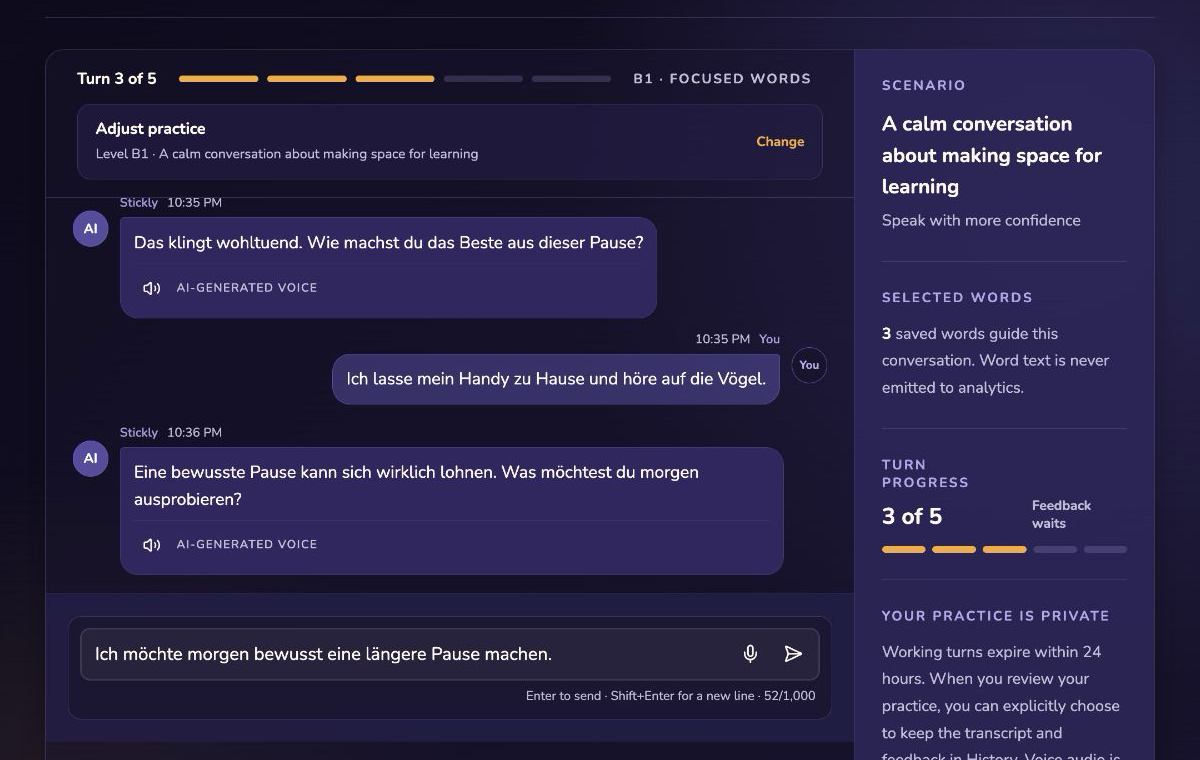
You can adjust the level and scenario without rebuilding the whole setup. Each session is deliberately limited to five learner turns, and corrections wait until the conversation is over. That keeps the practice itself conversational instead of interrupting every reply with grading.
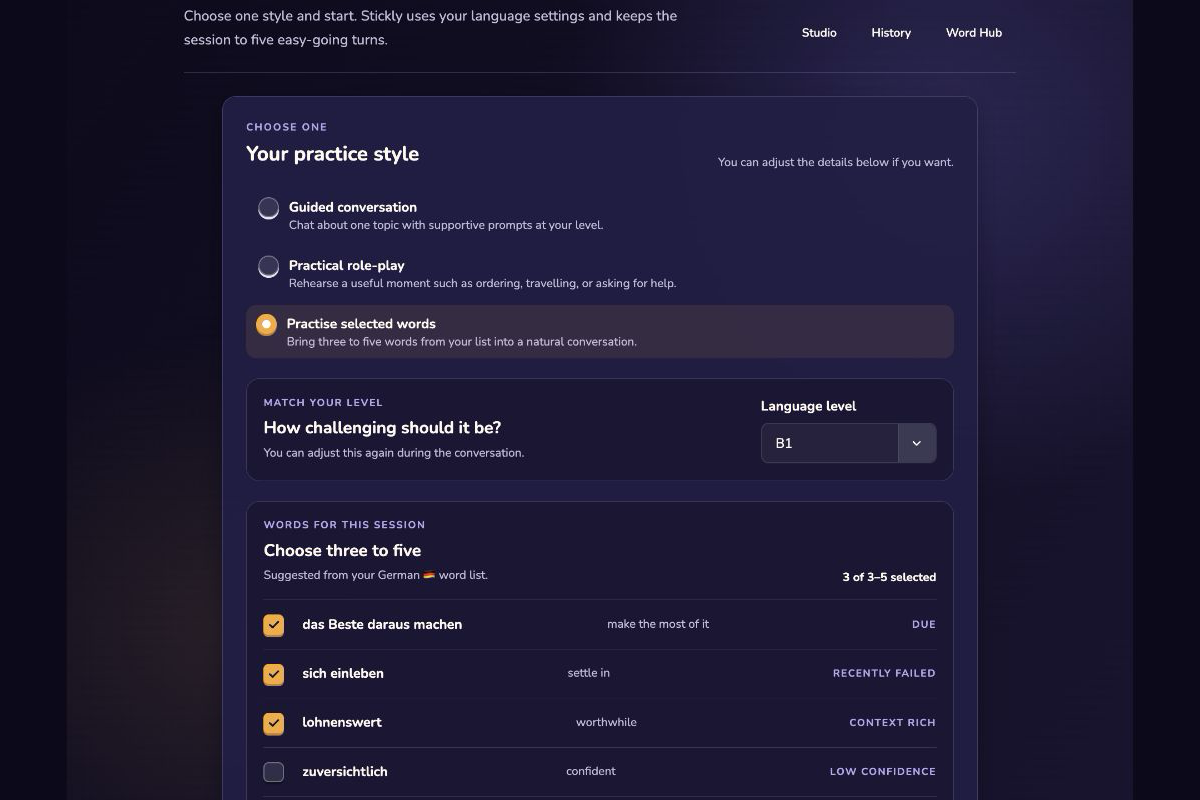
In text mode, your reply enters the conversation immediately while the partner prepares its next message. Every registered learner can also use live voice, with an on-screen transcript and microphone activity feedback while they speak. The partner’s role is to continue the chosen scenario, not to announce exercises or repeat a generic teaching script.
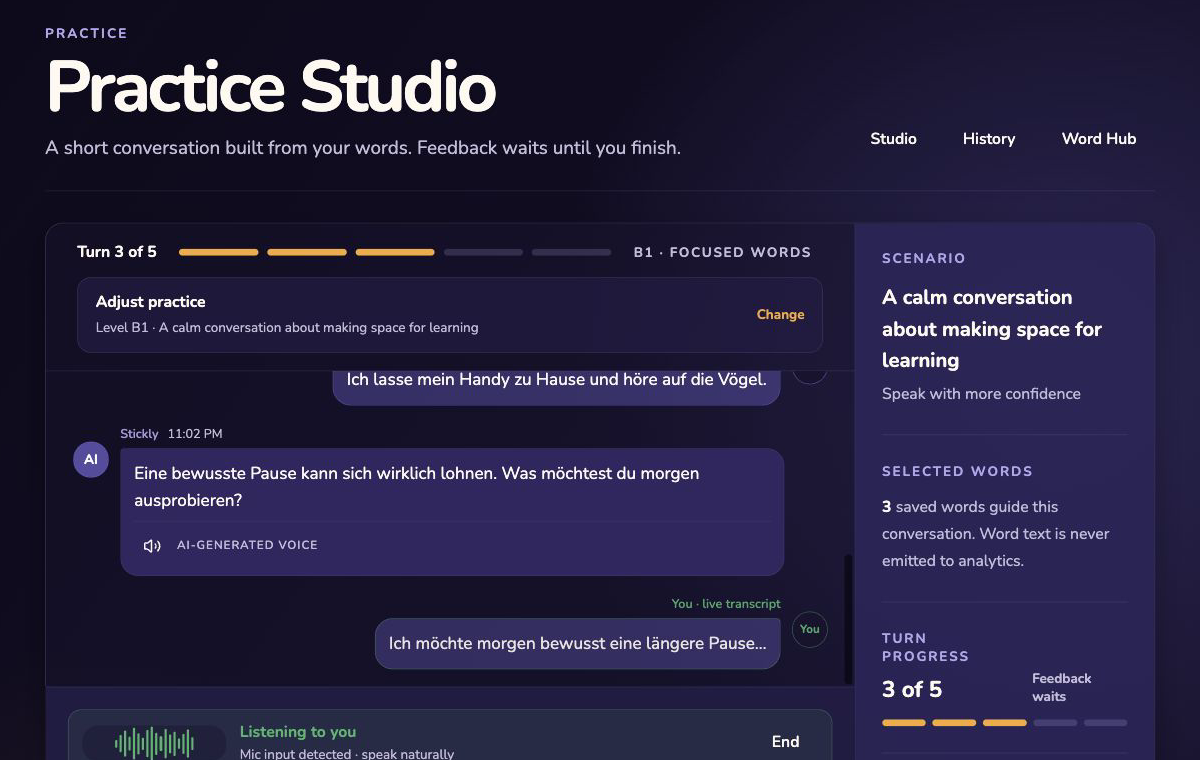
At publication, every registered learner can use voice or text for one free session in a rolling 24-hour window. Premium increases that allowance to up to 100 sessions in the same rolling window. That is an access allowance, not a recommendation to complete 100 sessions a day; short, repeatable practice is still the point.
Review the moment, not the model’s confidence
After the fifth turn, Stickly can show no more than three moments: a likely error, an optional improvement, or wording that may depend on context or region. For each one, you first write your own correction. Only then do you reveal Stickly’s suggestion and decide whether it seems useful, is verified, is disputed, or remains unresolved.
The AI cannot mark its own suggestion verified. An optional source URL or private note can help you decide, but neither is sent back with the review decision. This preserves the article’s central division of labor: the model proposes; the learner judges.
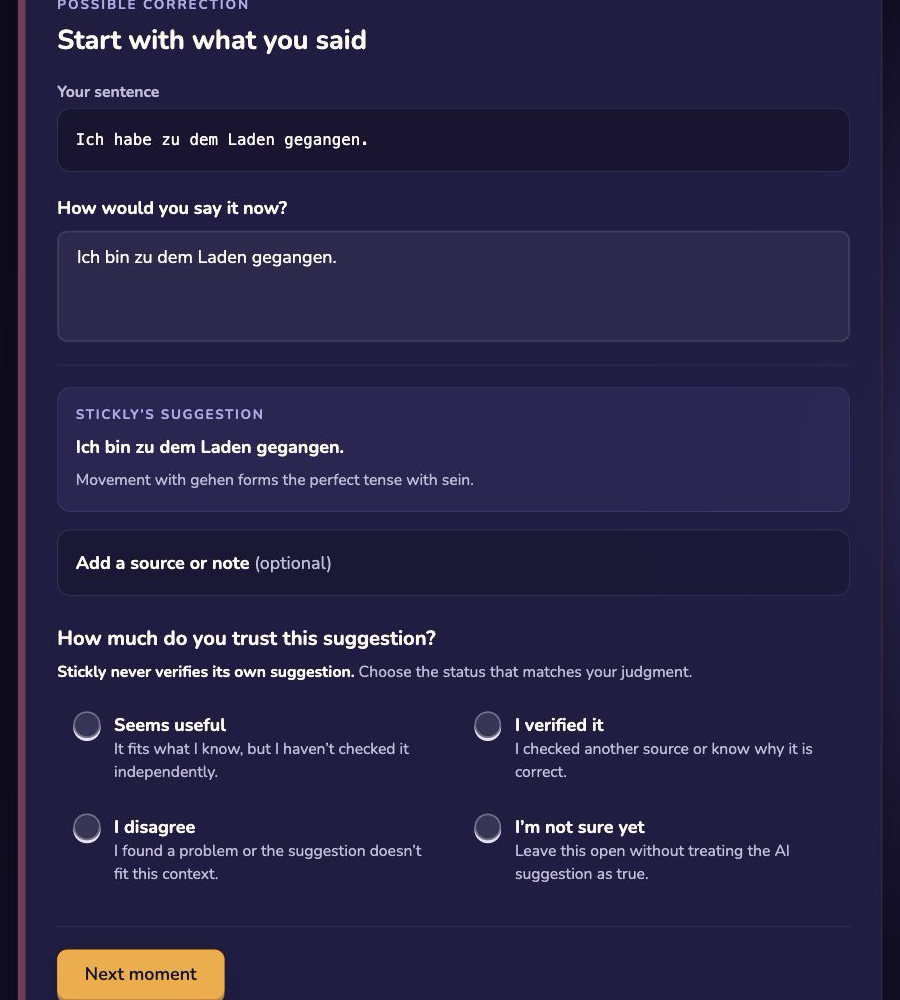
One verified phrase may be saved to Word Hub per completed session, including the free session. Saving creates an ordinary unreviewed vocabulary record; it does not count as recall practice and does not change spaced-repetition scheduling. Only the separate, explicit Test me now action can record recall and update the review schedule.
What leaves the session—and what does not
Working conversation turns and generated review drafts are backend-only and are removed when the review is finished, or within 24 hours at the latest. A transcript and its resolved feedback become durable history only if you explicitly choose to keep them. Stickly does not store voice audio, and source URLs and private evidence notes stay in the browser. Stickly sends Responses requests with application storage disabled, but OpenAI’s default abuse-monitoring logs may still contain prompts and responses for up to 30 days unless stricter organizational controls apply. Realtime voice is also currently listed with up to 30 days of abuse-monitoring retention. Review the OpenAI API data controls.
Practice Studio remembers bounded learning information such as explicit settings and goals, practice counts, hint or recall outcomes, resolved difficulty categories, and aggregate session summaries. It does not store inferred interests, and an AI judgment is never treated as proof of mastery.
The extension remains optional. On an eligible reading page where at least three of your saved words appear, it can quietly offer to practise words from that page. The scan and ranking happen locally; you choose three to five words before opening Studio. The handoff uses a short-lived, one-time opaque token, so the article text, URL, hostname, title, vocabulary, and Firebase IDs do not enter the link. If the handoff is unavailable, Practice Studio opens with its normal setup instead.
A final pre-save checklist
Before adding an AI-generated phrase to notes or flashcards, ask:
- Did the model preserve my meaning?
- Is this a correction or an optional rewrite?
- What is the smallest claim behind it?
- Could dialect, register, genre, or relationship change the answer?
- Have I checked an independent source suited to that claim?
- Does my evidence show suitability, not merely occurrence?
- Is the status verified, plausible, disputed, or unresolved?
- Is the consequence high enough to require a qualified person?
AI-generated language can be convincing while still containing errors or biased ideas, which is why critical assessment and human agency remain necessary. Read UNESCO’s guidance for generative AI in education and research.
The goal is not distrust for its own sake. It is a productive division of labor: let AI supply energy, variety, and low-stakes rehearsal; let evidence and qualified people settle claims that matter.
Try the workflow in Stickly: Start the three-reply preview without an account, then decide whether to continue into the full Practice Studio. Stickly remains a practice and vocabulary tool, not a grammar authority or source-validation system.
Sources
- Evaluating GPT-generated feedback for beginning-level Spanish writing
- Impact of prompt sophistication on automated written corrective feedback
- A systematic review of AI-based automated written feedback research
- GPT-3.5 for Grammatical Error Correction
- Evaluating Prompting Strategies for Grammatical Error Correction Based on Language Proficiency
- Are Large Language Models for Education Reliable Across Languages?
- ChatBack: Investigating Methods of Providing Grammatical Error Feedback
- Examining generative AI-mediated informal digital learning of English
- UNESCO guidance for generative AI in education and research
- English-Corpora.org search documentation
- Stickly product description
- OpenAI API data controls
AI-assisted research and automated checks by Stickly Editorial